
The Best Hidden Camera Detector Apps for iPhone (2026)
 Andrew·
Updated June 2026·
9 min read
Andrew·
Updated June 2026·
9 min read
A hidden camera detector app lets you check a hotel room, Airbnb, or rental with the phone you're already carrying. But they're not all the same: some only scan the Wi-Fi, some only read the magnetic field, and a few do several at once. Here are the six best hidden camera detector apps in 2026, ranked by how much of a room they actually cover.
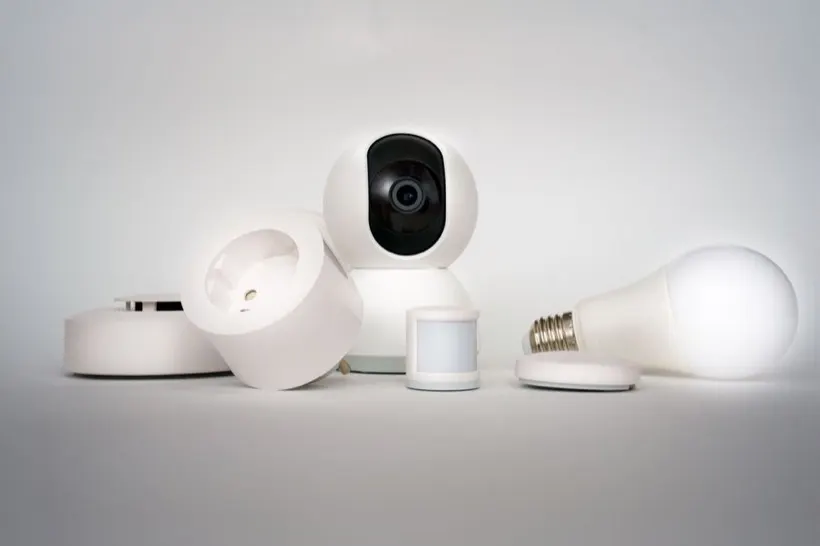
Best hidden camera detector apps: comparison
| App | Detection methods | Platform | App Store rating | Best for |
|---|---|---|---|---|
| Spyzero | Wi-Fi · infrared/lens · magnetic | iPhone | 5.0★ | Most complete sweep |
| Fing | Wi-Fi network | iPhone & Android | 4.6★ | Network scanning |
| Hidden Spy Camera Finder Pro | Wi-Fi · Bluetooth | iPhone | 4.4★ | Network + BLE |
| Hidden Camera Detector - Peek | Wi-Fi · infrared · magnetic | iPhone | 4.4★ | All-in-one alternative |
| Camera Detector App | Wi-Fi · infrared | iPhone | 4.4★ | Simple Wi-Fi check |
| Hidden Cameras Detector | Magnetic · infrared | iPhone | 4.6★ | Lightweight all-in-one |
How we ranked these apps
Finding a hidden camera comes down to three independent physical signals, and no single one catches everything:
- Network. Most modern spy cameras stream over Wi-Fi, so scanning the network can identify a camera by name or port.
- Optical. A lens reflects light, and night-vision cameras emit infrared the phone camera can see.
- Magnetic. Electronics distort the local magnetic field, which can surface devices that never go online.
So we ranked each app on the whole package a traveler actually gets, not a single spec: how many of these methods it covers, whether the scans stay private and on-device, how much is locked behind a paywall, how quickly you can run a full sweep, and how proven the app is on the App Store. Those pull in different directions. A focused tool like Fing covers one method but does it better than anything else, with years of trust behind it, while an app can cover all three methods and still lean hard on subscriptions. Pricing barely separates the field: every app here is free to download and freemium, with advanced or unlimited scans behind a one-time purchase or subscription. We put Spyzero first for combining all three methods with on-device privacy at no cost; the order below reflects how the rest balance coverage, reliability, and value.
Full disclosure: Spyzero is our own app. We've put the ranking criteria above in the open and linked every competitor's App Store page, so you can weigh the list for yourself.
The 6 best hidden camera detector apps in 2026

Spyzero: Hidden Camera Scanner
by Avery Gan · iPhone, iOS 18+
Why it's our pick: Spyzero runs all three scans (Wi-Fi, infrared, and magnetic) from one place, on-device, then guides you to the spots cameras tend to hide and lets you cross-check hits across methods. Free, no account, nothing extra to carry.
Best for: travelers and renters who want one tool that covers the whole room in about three minutes.
The catch: iPhone only (iOS 18+), and like every detector it can't promise to find a camera that's powered off and recording locally. Its Wi-Fi list also isn't as exhaustive as a dedicated network tool like Fing's. The privacy is a genuine plus, though: scans never leave your phone.
View Spyzero on the App Store →
Fing - Network Scanner
by Fing Limited · iPhone & Android
What it does: Fing is the best network scanner around. Join a Wi-Fi network and it lists every connected device, with vendor names and open ports, which makes a streaming IP camera easy to spot.
Best for: anyone who just wants the most detailed list of what's on a network.
The catch: it's a network tool, not a camera detector. It can't check for infrared, lens reflections, or magnetic anomalies, so a camera recording to a local card is invisible to it.
View on the App Store →
Hidden Spy Camera Finder Pro
by DREAMTEAM APPS · iPhone
What it does: a popular, polished scanner that lists suspicious devices on the current network and adds a Bluetooth scan to catch nearby BLE gadgets and trackers.
Best for: users who want network plus Bluetooth coverage in a friendly interface.
The catch: no magnetometer sweep, and the most useful features tend to sit behind a subscription.
View on the App Store →
Hidden Camera Detector - Peek
by Kupertino Bilisim · iPhone
What it does: covers all three methods: a Wi-Fi network scan, an infrared and optical camera check, and a magnetometer sweep, wrapped in a clean, guided interface. It's the closest thing here to an all-in-one alternative to our pick.
Best for: anyone who wants all three scans and prefers Peek's interface or needs the bigger review history.
The catch: the most useful scans tend to sit behind a subscription, and like any magnetometer its magnetic check reacts to ordinary metal too.
View on the App Store →
Camera Detector App
by HMA Mobile · iPhone
What it does: a straightforward scanner that checks the Wi-Fi network for unusual devices and includes an infrared view to help spot camera LEDs.
Best for: a quick, no-fuss network check when you just want to see what's on the router.
The catch: lighter on the magnetic side, and free use is ad-supported with paid upsells.
View on the App Store →
Hidden Cameras Detector
by NextGenTech · iPhone
What it does: a newer, lightweight app that bundles a magnetic detector and an infrared viewer with a clean, guided interface.
Best for: someone who wants a simple guided sweep without a lot of settings.
The catch: a smaller track record than the others, and no network scan to catch Wi-Fi cameras.
View on the App Store →One app, all three scans
Spyzero runs the Wi-Fi, infrared, and magnetic scans from your iPhone, on-device, in about three minutes. No account, free to download.

How to actually use a hidden camera detector app
Whichever app you pick, the method is the same, and works best when you combine the scans rather than trusting one:
-
Scan the Wi-Fi first
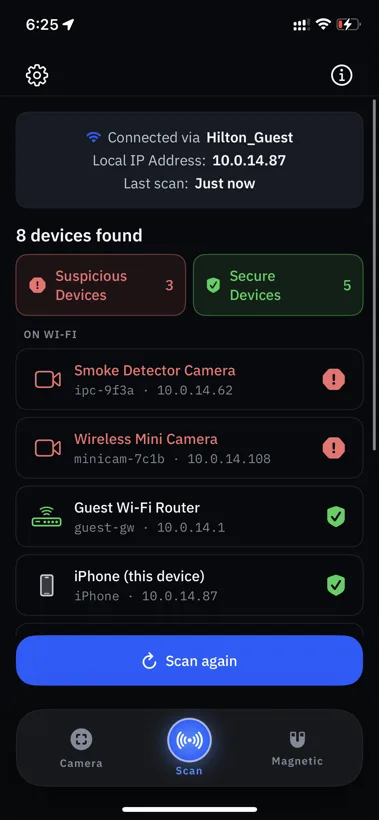
Join the room's network and run a device scan. Anything that identifies as a camera, names an unfamiliar vendor, or exposes camera ports deserves a second look.
-
Sweep optically in the dark
Dim the lights and pan the phone camera across objects facing the bed. Watch for the faint glow of infrared LEDs and the sharp glint of a lens.
-
Check suspicious objects magnetically
Pass the phone within a few inches of smoke detectors, vents, clocks, and chargers. A magnetic spike on an object with a clear view of the bed is worth investigating.
For the full room-by-room method, including what to do if you find one, see our guide on how to find hidden cameras in an Airbnb or hotel.
Frequently asked questions
What is the best hidden camera detector app in 2026?
Spyzero, for most people. It covers all three detection methods (Wi-Fi, infrared/lens, and magnetic) in one iPhone app and keeps every scan on-device, free. Peek covers the same three and is a solid alternative; single-method apps like Fing are excellent at their one job but leave the other methods uncovered.
Do hidden camera detector apps actually work?
Yes, within limits. They reliably flag Wi-Fi cameras, infrared LEDs, lens reflections, and magnetic anomalies. None can promise to catch a camera that's powered off and recording to a local card. Apps that combine methods give the most reliable read.
Are hidden camera detector apps free?
Free to download, mostly. Spyzero, Fing, and Hidden Spy Camera Finder Pro are free to install, but nearly all of these apps are freemium and put unlimited scans or advanced features behind a one-time purchase or subscription. Spyzero is free to download and keeps every scan on-device.
Is Fing a hidden camera detector?
Not exactly. Fing is a network scanner. It lists devices on a Wi-Fi network, which can surface a networked camera, but it can't check for infrared, lens reflections, or magnetic anomalies the way a dedicated detector app can.
iPhone or Android for finding hidden cameras?
Either can scan, but the apps differ. Network and infrared checks work on both platforms. Spyzero is iPhone-only (iOS 18+); Fing is cross-platform. Pick an app that covers the most detection methods on your device.